Familiar Service Blueprint
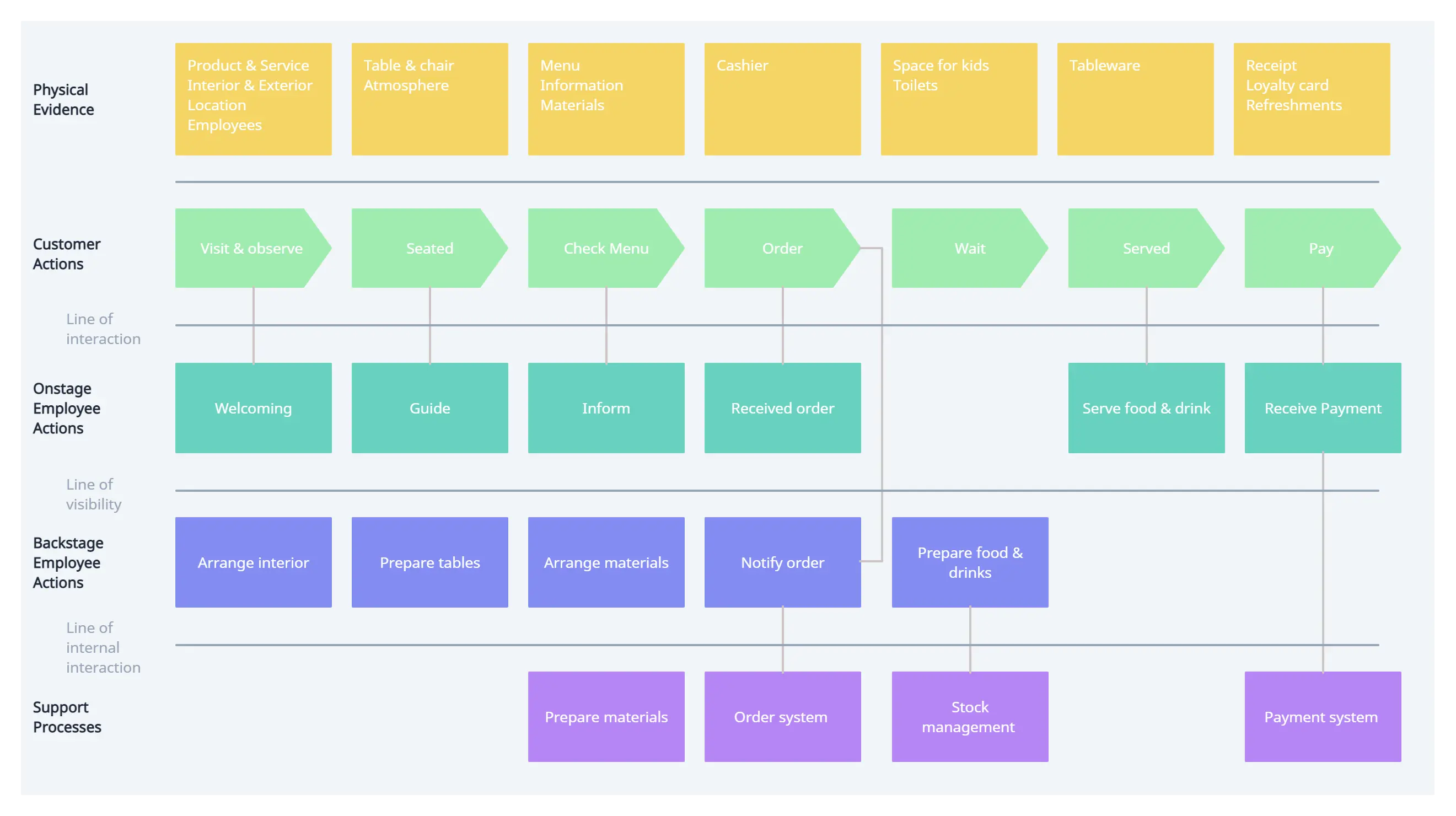
A service blueprint is a tool that helps teams understand how the customer sees or experiences a business’s service process. It’s a diagram that visualizes relationships between people, processes, and physical and digital touchpoints tied to a specific customer journey.
Think of a service blueprint like a treasure map. Some golden business opportunities may be hidden – even in plain sight. By creating a map, you’ll discover a path to achieving business goals by solving real needs, removing redundancies and silos, or improving an employee’s experience. Service blueprints are designed to reveal the multi-layered nature of how lots of different types of people and technologies either work together or – in some cases – don’t in a business setting.
Wondering when you’d use a service blueprint? For example, with a hotel, you might map out the entire service experience of your check-in process.
– How to make effective service blueprints, Miro
We’ve made concept maps describing the internal logics of our souvenir. And shared what we think the ideal way to experience our souvenirs are. A logical next step in our process would be to create a service blueprint of how to access our souvenirs and reframe them as a service.
As a way to warm up our service design thinking we will apply the idea of blueprints to a familiar action typically not thought of as a service. In groups of three choose from one of the following actions:
- Shaking hands
- Ending a phone call
- Giving up your seat on the bus
- Letting someone pass in a doorway
- Choose your own...
And make a copy of this Figma file to make a service blueprint for it.
The goal of this exercise is to have fun, and expand our idea of how we may think about services which aren’t entirely commercial. If you have time, work with your groups to make service blueprints for your souvenirs.
The process of making a Service Blueprint, according to Miro, is as follows:
Here are five puzzle pieces you need to have when creating a service blueprint.
- The customer’s actions: ... extract the steps, choices, activities and interactions a customer may go through to reach their goals.
- Frontstage actions: These actions happen in front of the customer. They are usually either human-to-human (for example, a customer interacting with an employee at a cash register) or human-to-computer (for example, a customer dealing with an ATM transaction) interactions.
- Backstage actions: Behind-the-scenes activities to support frontstage activities, which can either be carried by a backstage employee (a head chef in the kitchen) or a frontstage employee who completes a task not visible to the customer (printing out a bill before bringing it to the table).
- Support processes: These are a series of steps and interactions that support employees in delivering a service to their customers.
- Physical evidence: This is the proof that the interaction actually happened. Examples can include the product itself, receipts as proof of purchase, physical storefronts, or websites.
Service blueprints also tend to have three key lines:
- The line of interaction: direct interactions between the customer and the organization.
- The line of visibility: separates what’s visible and invisible to the customer – everything visible is above the line; everything backstage is below the line.
- The line of internal interaction: separates employees who have direct customer contact with those who don’t directly support customer interactions.
In summary, work in groups of 3 to make a Service Blueprint for an everyday action.
Optionally: if you have time create a service blueprint for accessing your souvenir.
References
- 4 Key Components of Service Blueprints, NN/g
- How to make effective service blueprints, Miro
- Figma Service Blueprint Template, by Justin Zalewski (make a copy to use)